
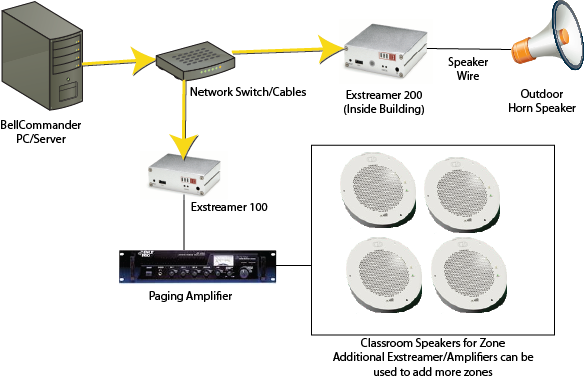
Description:
The patented network audio configuration allows different audio to be broadcasted to each network audio device, so different bell schedules can be set for different areas and announcements can be targeted to a single network audio device. The network audio devices can be connected anywhere on the network and could be used, for example, to send individualized announcements to a classroom. Each network audio device is then connected to speakers or to an amplifier driving multiple speakers. This configuration is ideal for schools with different buildings or areas of buildings on different schedules. The configuration is also ideal for stores which would like to broadcast audio to different areas of the store.
Data Sheet:
Download
Success Story:
Read about how the Ross School benefited from this configuration
Device Preview:
If your organization would like to evaluate the full hardware and software solution before purchasing, we now offer an option to have a network audio devices shipped to you for $20 U.S. for shipping and handling within the U.S. for a 30-day trial. If you are satisfied with the devices, simply pay the retail price per device at the end of the evaluation period, or return the devices. We have partnered with Barix, a leader in commercial network audio products, and support a variety of devices, including devices with built-in amplifiers and wireless. We are also an authorized dealer for Barix products and can provide the Barix devices in addition to the BellCommander software. If you are interested in the hardware trial, please email previews@www.acrovista.com
Compatible Devices:
BellCommander is compatible with Barix audio over IP devices, including the following models:
Barix Exstreamer 100 – Line audio output
Barix Exstreamer 200 – Built-In 25-watt, 8 ohm amplifier
Barix Annuncicom 100 – Broadcasts live messages from a microphone to the full-line of Barix Exstreamers
Barix Annuncicom 200 – Broadcasts live messages and includes built-in 8 watt amplifier
We are an authorized dealer for Barix and can provide the full line of Barix products with discounts for multiple unit orders.
Additional Configuration Options:
Typical configurations with the network audio devices include installing a network audio device in each classroom or using 70 volt paging amplifiers and speakers to reduce cost. With a network device in each classroom, pages and bell schedules can be targetted to specific classrooms. With a 70 volt paging amplifier, multiple classrooms can be grouped into a single zone with an Exstreamer 100 and amplifier driving speakers in each classroom which lowers the total cost of the system.
Requirements:
Pentium 1.8 GHz or higher processor (dual core processor recommended)
Windows 10, 8, 7, Server 2016, Server 2012, Server 2008R2
1 or more network audio devices
Network connection for each device and PC
Configurations:
Client PC Configuration
Client PCs distribute audio across an organization
Network Audio Configuration
Network devices distribute audio across an organization
Combination Network Audio
Both network devices and client PCs distribute audio
BellCommander USB Relay Controller
Control school bells, factory bells, factory horns with relays/contact closures
BellCommander Network Relay Controller
Control school bells, factory bells, factory horns with relays/contact closures remotely over a network
Phone Paging Configuration
Send automated phone pages for school bells, factory bells, factory horns, and more
Single Zone PA System
Sound card output is sent to PA system for bells/announcements
Local Speakers
Sound card output plays to local speakers
Multi-Classroom
Multiple installations
Single Zone Remote Audio
Audio is transmitted from the sound card wirelessly to a remote receiver
