
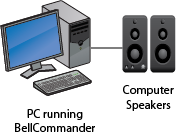
Description:
This is simplest configuration where a single PC is used to play sounds to speakers connected to the PC. This setup is popular for home users for reminders, such as appointment and medicine reminders. This configuration could also be used for small store fronts for store announcements where a PC on the floor is not an issue.
Requirements:
Pentium 1.0 GHz or higher processor
Windows 10, 8, 7, Server 2016, Server 2012, Server 2008R2
Sound Card
Computer speakers
Configurations:
Client PC Configuration
Client PCs distribute audio across an organization
Network Audio Configuration
Network devices distribute audio across an organization
Combination Network Audio
Both network devices and client PCs distribute audio
BellCommander USB Relay Controller
Control school bells, factory bells, factory horns with relays/contact closures
BellCommander Network Relay Controller
Control school bells, factory bells, factory horns with relays/contact closures remotely over a network
Phone Paging Configuration
Send automated phone pages for school bells, factory bells, factory horns, and more
Single Zone PA System
Sound card output is sent to PA system for bells/announcements
Local Speakers
Sound card output plays to local speakers
Multi-Classroom
Multiple installations
Single Zone Remote Audio
Audio is transmitted from the sound card wirelessly to a remote receiver
