
BellCommander 5.0 Now Available
Easy-to-use factory bell and school bell system with advanced mass notification
– Play school/factory bells, announcements, and music over your existing PA or intercom system
– Play scheduled audio and send live audio pages to PCs or Macs around your organization
– Use network audio players to play scheduled audio and live pages in classrooms and other buildings
– Control your existing bell system or factory bells/horns using network or USB Relay Controllers
– Send automated pages to phone-based paging systems
– Send live pages for emergency notification to network audio players and client PCs and Macs
– Send text and audio to IP message board/clock units
– Send live pages and trigger emergency notifications from SIP phones
– SIP/Multicast Version for integration with SIP/2.0 compliant systems including 3CX, Asterisk, Allworx, FreePBX, RingCentral, 3Com, Cisco, Panasonic, Mitel, ShoreTel, Adtran, and Avaya
– NEW! – Web Manager with a new modern interface and the ability to manage an entire district from a single server
BellCommander is easy-to-use and affordably priced, starting at $79.95 for the sound card version. Other school bell software applications are priced at hundreds of dollars more with fewer features and do not have the expandability of BellCommander.
BellCommander is trusted by customers around the world, including Bell Helicopter and over 5,000 schools, factories, and other businesses:
Success Stories:
BellCommander Provides School Bell, Paging, and Mass Notification System for Polk County Schools, Florida
BellCommander Provides VoIP School Bell and Emergency Notification Solution for Centennial School District
| Benefits |
|---|
| Save thousands of dollars with easy-to-use Windows and network-based technologies |
| Never be stuck with ordinary school bell sounds again – Play any standard audio file (WAV or MP3) to the bell system – Play popular sounds such as included chimes and tones, traditional school bell sounds, or play custom sounds/music such as the national anthem |
| Create powerful multi-zone school bell systems or factory bell systems using PCs around your organization and/or network audio players – Patented system offers multiple audio zones like a traditional intercom system – No special wiring needed – Uses existing TCP/IP network infrastructure |
| Manage bell schedules, zones, and sound sequences remotely using the BellCommander Web Manager |
| Use BellCommander’s paging station client to send live or recorded pages |
| Easy-to-use and even a novice Windows user can quickly create and maintain bell schedules |
| Configurations |
|---|
| Client PCs and Macs – Play school bells and send live pages to computers around your school or company. Each client can receive different audio, so bells and pages can be targeted to individual classrooms. |
| Network Audio Devices – Connect small devices in each classroom to play school bells and pages or connect network devices to amplifiers to provide audio for larger areas. |
| Analog Phone System Paging – Schedule audio pages and bells over a phone system using an analog port on the phone system. |
| SIP Phone System Paging – Schedule audio pages and bells over IP phone systems that support SIP endpoints. |
| Public Address Systems – Connect an audio cable from the PC to your school’s PA system and play school bells over the existing public address system. Low cost and easy-to-program alternative to mechanical and electronic school bell timers. |
| Network and USB Relay Controllers – Control existing school and factory bell systems and devices such as as sirens, strobe lights, signal lights, and more. Perfect as a replacement for hard to program and manage mechanical and electric timers. |
| Stand-Alone PCs – Play audio files locally on a PC. Great for simple reminders or for setting bells for a specific classroom. This configuration is often used in schools which have each classroom on a specific schedule. |
| Features |
|---|
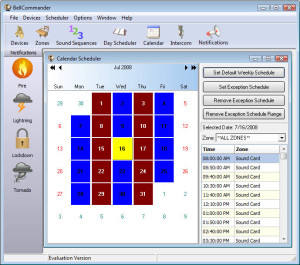
| Powerful Scheduler – Program standard or block bell schedules – Easily define and set holiday and assembly schedules – Change schedules on-the-fly |
| Patented Multiple Zone Support – New technology uses network audio devices which can play any MP3 or WAV audio file – Devices can be installed anywhere on the network and do not require a direct connection to the PC – Multiple devices can be grouped together to create larger zones – Easy to deploy and requires only limited network knowledge for network configuration – Easy to program and requires only basic Windows knowledge |
| Low-Cost Single Zone Support – Uses a standard PC sound card to send audio to speakers or existing PA system – The most powerful automatic school bell software application available with support for 200+ bells per day and multiple day schedules – Multiple sound cards supported to allow BellCommander to use dedicated sound cards – Great value compared to bell timers and other school bell programs |
| Send live pages from a PC microphone |
| Run BellCommander as a Windows service in paid versions. Run scheduled audio even without a user logged in |
| Popular bell sounds included |


